Apple’s Touchscreen MacBook Pros May Get a Smaller Dynamic Island—Here’s What That Means
Reports say OLED touchscreen MacBook Pros could debut a smaller Dynamic Island this fall. Here’s how it might change macOS for users, devs, and IT.
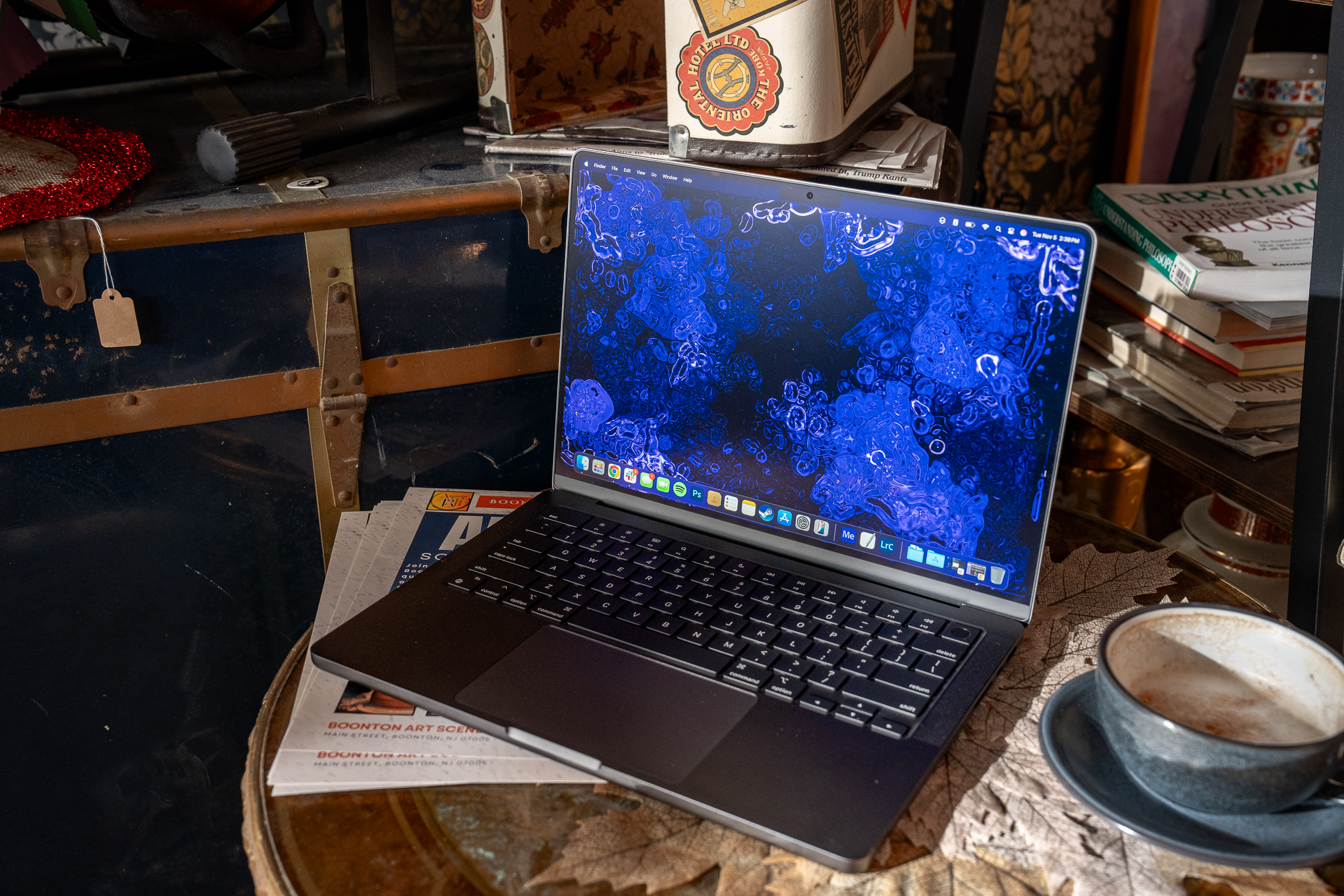
A notch that does something was the iPhone’s party trick. Now, that living pill might move to the Mac—right as Apple finally embraces touch on its laptops. If reports hold, the first OLED touchscreen MacBook Pros due this fall could also debut a Mac-style Dynamic Island. That combo would signal more than a new display; it hints at a rethink of how macOS surfaces live information—and how you’ll use a Mac beyond the cursor [3].
So are touchscreen MacBook Pros actually happening this fall?
According to reporting summarized by The Verge, Apple is preparing 14- and 16-inch OLED MacBook Pros with touch support for release as soon as this fall. These models are said to look largely like today’s machines but introduce a smaller, Mac-specific Dynamic Island and UI refinements to make macOS feel more “dynamic” for both touch and pointer input [1]. None of this is confirmed by Apple, but the cadence matches how Cupertino typically lands major hardware changes—roll them into the Pro line first, where the cost and complexity are easier to justify, then let the ideas cascade down.
The Dynamic Island first arrived on the iPhone 14 Pro lineup as a pill-shaped cutout that expands and morphs to show system alerts and app-driven updates in real time. Apple leaned into it with animations that feel native to iOS and with developer hooks tied to Live Activities [4]. A Mac riff would likely be more subtle—less about hiding a camera cutout and more about creating a status surface you can glance at or tap.
The headline isn’t just “touch comes to Mac.” It’s that Apple appears ready to blend quick, ambient updates—now familiar on phones—into the rhythm of desktop work, without trashing the Mac’s precision-first DNA.
What a Dynamic Island on Mac could do beyond notifications
If you know the iPhone version, you know the vibe: the Island expands to surface up-to-the-minute info—timers, calls, music playback, navigation, screen recordings—and then gets out of your way. Apple’s own design guidance describes it as a live, glanceable space that integrates with the system status area rather than another window to manage [5].
Translate that to a MacBook Pro and a few use cases jump out:
- Controls that follow your focus: Recording indicators, mic/camera status, and AirPlay/AirDrop progress could live in a consistent, interactive strip instead of scattered menus.
- Pro workflows at a glance: Video editors might see render progress. Developers could watch build status. Data pros could track a query or job running in the background—peekable, not modal.
- Continuity made obvious: When you hand off music from iPhone, pick up a call on your Mac, or auto-switch AirPods, the state change could animate in one predictable spot.
- System intelligence, less interruption: Low battery warnings, network changes, and calendar conflicts could appear as live elements that you expand when you care and ignore when you don’t.
Because a Mac has more screen real estate—and a menu bar—Apple will have to balance visibility with clutter. Expect the Island’s behaviors to be tuned to desktop rhythms: precise hover states for the pointer, larger hit targets for touch, and strict limits on how long it occupies attention. The win isn’t flashy animation. It’s faster state awareness with fewer disruptive windows.
What the evidence says: OLED, sizes, and UI changes
The report points to 14- and 16-inch MacBook Pros with OLED panels, broadly similar chassis, and a Dynamic Island that’s smaller than on current iPhones. Alongside the hardware, macOS would gain interface tweaks to make it feel more “dynamic,” and to work well whether you drive it with the trackpad or your fingers [1]. If true, that’s a notable turn from Apple’s 2020 stance: senior executives publicly argued that touch wasn’t right for the Mac, pointing users to the iPad for a direct-input experience [3].
OLED would be doing double duty here. On the display side, it enables deep blacks and high contrast—useful if the Island’s elements aim to blend into the menu bar until needed. On the power side, OLED can be efficient when much of the UI is dark, which could help offset any energy overhead from animated surfaces. And if Apple keeps ProMotion (high refresh), motion in the Island can feel fluid without dragging the whole UI.
On the software side, there’s a ready-made playbook. The iPhone’s Dynamic Island is backed by system-level design rules and APIs that constrain what can appear, how it expands, and how users interact with it. Apple’s Human Interface Guidelines outline when to use it, where to show controls, and how to avoid hijacking attention [5]. A Mac version would need similarly opinionated rules to prevent a menu-bar free-for-all.
The bigger strategic thread: Apple has already normalized “live” UI on the lock screen and Home Screen with Live Activities on iOS. The Dynamic Island is the tip of that spear. Moving the concept to macOS would align the platforms around a common philosophy—real-time, glanceable state—implemented natively, not as a web-style notification feed [4][5].
What this means for developers and everyday workflows
For developers:
- Start designing with dual input in mind. Even before touch ships on macOS, ensure your hit targets, spacing, and hover/tap states make sense for both pointer and touch. Apple’s guidance on adaptable controls from the Dynamic Island era is a useful north star [5].
- Favor system containers. If a Mac Island ships, Apple will likely gate it behind system APIs—just as on iPhone—to keep behavior consistent. Apps that already expose progress, playback, and session state via existing frameworks will adapt faster.
- Lean into SwiftUI where practical. Not because SwiftUI is a magic ticket, but because it helps unify declarative UI and state across Apple platforms, making it easier to slot into system surfaces.
For teams and IT buyers:
- Procurement timing matters. If you’re eyeing MacBook Pro refreshes for the back half of the year, consider whether potential touch and UI changes alter training, app compatibility, or accessibility needs. If you rely on menu bar utilities, test how they might coexist with a new live surface.
- Accessibility first. Touch on a clamshell invites posture issues for prolonged use. Ensure external keyboards/trackpads remain primary for heavy work, and verify that VoiceOver, switch control, and full keyboard access map well to any new UI.
For everyday users:
- Expect small wins that add up. If the Island surfaces the right bits—your next meeting countdown, the current call status, a running export—you’ll spend less time digging through windows and more time in flow.
- Don’t expect an iPad on a hinge. macOS is built for the pointer. Touch will likely complement, not replace, the trackpad. Apple has been explicit about that ethos in the past, and a desktop-appropriate design is more likely than a wholesale pivot [3].
Edge cases and friction to watch:
- Ergonomics. Reaching to tap a vertical screen is fine for quick interactions, not for hours of work. Apple’s challenge is to make touch optional and rewarding, not mandatory.
- Fragmentation. If only some Macs get the Island and touch at first, designers will juggle a split UI landscape for a while.
- Menu bar real estate. Power users already jam icons up there. A new live surface must play nice with menu bar extras without causing pixel panic.
Your top questions about Dynamic Island on Mac
- Will my current Mac get this via software? Unlikely. The “Island” is as much about hardware layout and animations around a camera/sensor zone as it is a software flourish. Expect any Mac Island to be tied to specific models [4][5].
- Does this replace the notch? Reports suggest a smaller Island than on iPhone, not necessarily the removal of a notch outright. Apple could keep a camera area and simply animate around it [1].
- Can I turn it off? On iPhone, you can’t remove the Island, but you can control what apps surface Live Activities. On Mac, expect granular settings for what’s allowed to appear—especially in Focus modes [5].
- Will third-party apps hook into it? Almost certainly, but via Apple’s rules. The iPhone model restricts abuse with clear design/API limits; a Mac version would follow suit [5].
- How would this affect battery life? OLED and careful use of dark UI can mitigate impact, but anything that animates can cost energy. Expect Apple to optimize for idle efficiency and short, purposeful motion.
- When would we see it? The reporting points to this fall for OLED touchscreen MacBook Pros, but until Apple announces, timelines can slip [1].
The short list
- Touch is reportedly coming to MacBook Pro alongside OLED—and possibly a smaller, Mac-ready Dynamic Island [1].
- Apple’s past “no touchscreen Mac” stance makes this a strategic turn, not just a hardware spec bump [3].
- Expect the Island to surface live, glanceable state with strict design rules, echoing the iPhone approach [4][5].
- Developers should prep for dual input, system-driven surfaces, and carefully bounded interactions.
- Early adopters: weigh procurement timing, accessibility needs, and menu bar crowding before you upgrade.
Sources & further reading
Primary source: theverge.com/tech/884089/apple-touchscreen-macbook-pro-dynamic-island
Written by
Ryan Torres
Tech journalist covering gadgets, software, and the innovations shaping our digital world.
Related Articles
Welcome to Tech Pulse
Breaking tech news, gadget reviews, software updates, and the future of technology.
Apple’s new age-assurance tools will block underage app downloads where laws demand it
Apple’s App Store can now confirm age and block 18+ app downloads where local laws require checks, easing developer compliance while introducing new edge cases.
Boozy chimps, positive pee: a messy field test backs a big evolution idea
Wild chimp urine tested positive for alcohol metabolites, reinforcing the “drunken monkey” hypothesis and reshaping how tech tackles drinking behavior.